 Weezlyvs
 Linked HelperRuns even when you don't.
Linked Helper works while your laptop does.
Weezly works while you sleep.
Full respect: at $15 a month, Linked Helper is the honest price champion of LinkedIn automation. It is also a desktop app, so your campaign lives and dies with your power button. Weezly runs in the cloud: it sends a video of your AI clone into the DM at 2:14 AM, reads the reply, fills the pipeline and books the meeting before your alarm goes off.


 Linked Helper's day desktop appWeezly's day cloud
From Linked Helper's own docs: it is "not a cloud solution", it works locally on your PC, and campaigns run while the program is open. Their supported fix is a VPS you rent and configure yourself.
The price is real. So is the power button.
Nobody should mock $15 a month, $8.25 on annual: that is honest work, and the feature list it buys is enormous. But two structural facts follow it everywhere. It only runs while your machine does. And everything it does ends at "message sent".
Standard $15/mo and Pro $45/mo per LinkedIn account, $8.25 and $24.75 on annual, from their published pricing, July 2026 (check their pricing, it changes).
Architecture and VPS guidance from Linked Helper's own support docs, July 2026. The no-unified-inbox point is from published hands-on reviews, not our claim.
Not advertised on their site, pricing or help docs, July 2026. The email finder and LH CRM are real and credited above: a finder is not a searchable database, and a contact log is not a reply pipeline.
The machine that works nights.
Six parts, one $59 subscription, all illustrated below with live coded scenes and real app screenshots. Everything Linked Helper automates, minus the babysitting, plus everything that happens after the send.
Cloud, always onYour clone300M+ leadsMobile appNo VPSThey count 30+ actions. Ours count meetings.
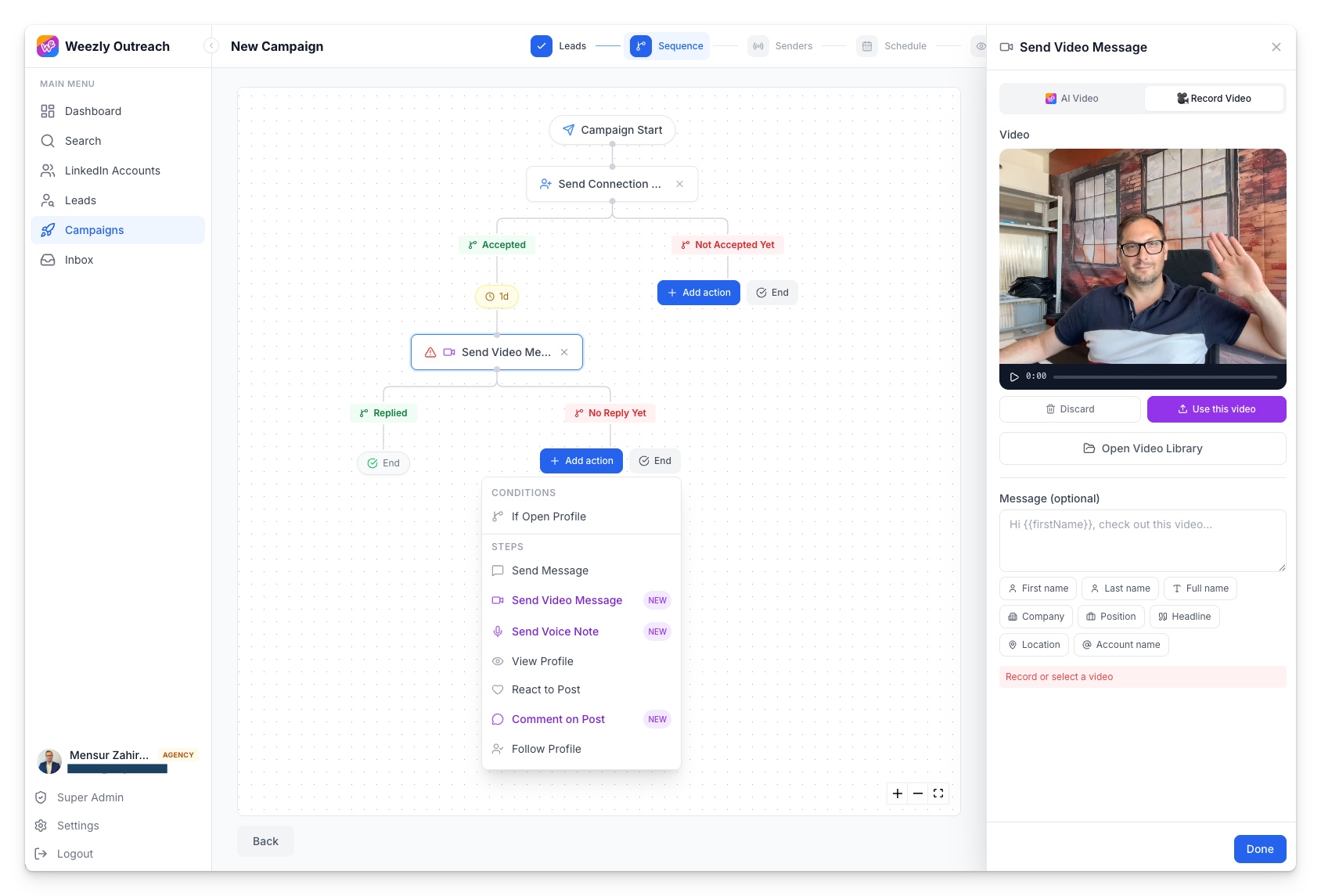
The real builder below, exactly as it looks in the app: branching sequences like theirs, built in a browser tab, run by the cloud, with the step types their action list does not have.
The 2:14 AM DM.
One real thread where the timestamps do the talking. Your machine slept through all of it; the sequence did not.
Campaigns resume when you log back in.
0 actions until morning🔥 Positive reply from Petra
Hi Petra, made this for you about Klarna's SDR ramp 👇
Sent with Weezly Your clone · made for PetraTheir AI writes text. Ours wears your face.
Linked Helper's AI credits generate message copy, which is useful. Weezly clones you from one take and renders a unique video per lead, overnight, in 25 languages.
You record once, awake. Your clone works the night shift.
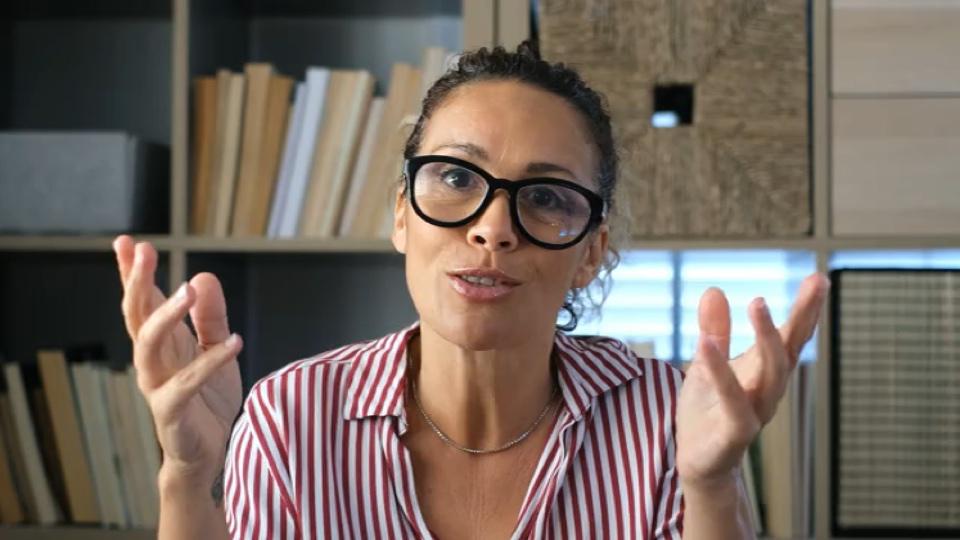
One two-minute take clones your face and voice. From then on the cloud renders a unique video per lead, in 25 languages, and uploads the actual file into the DM, on a schedule that never checks whether your laptop is plugged in.
🇸🇪🇸🇪🇩🇪🇫🇷Linked Helper's AI credits write message text. They do not put your face in the thread.
We tested the other clone engines. It was not close.
We ran the same two minute recording through Sendspark, Hippo Video, Sendr and the leading clone engines in our own side by side tests, July 2026. Weezly's face and voice clone was the only render we would put in front of a real prospect.
- Same two minute source take, same script, side by side
- Judged the only way that matters: could we tell it from the real recording?
- The clone videos playing on this page are unedited Weezly renders



Your face, your voice, generated. Judge it yourself.
A database you search, not credits you burn.
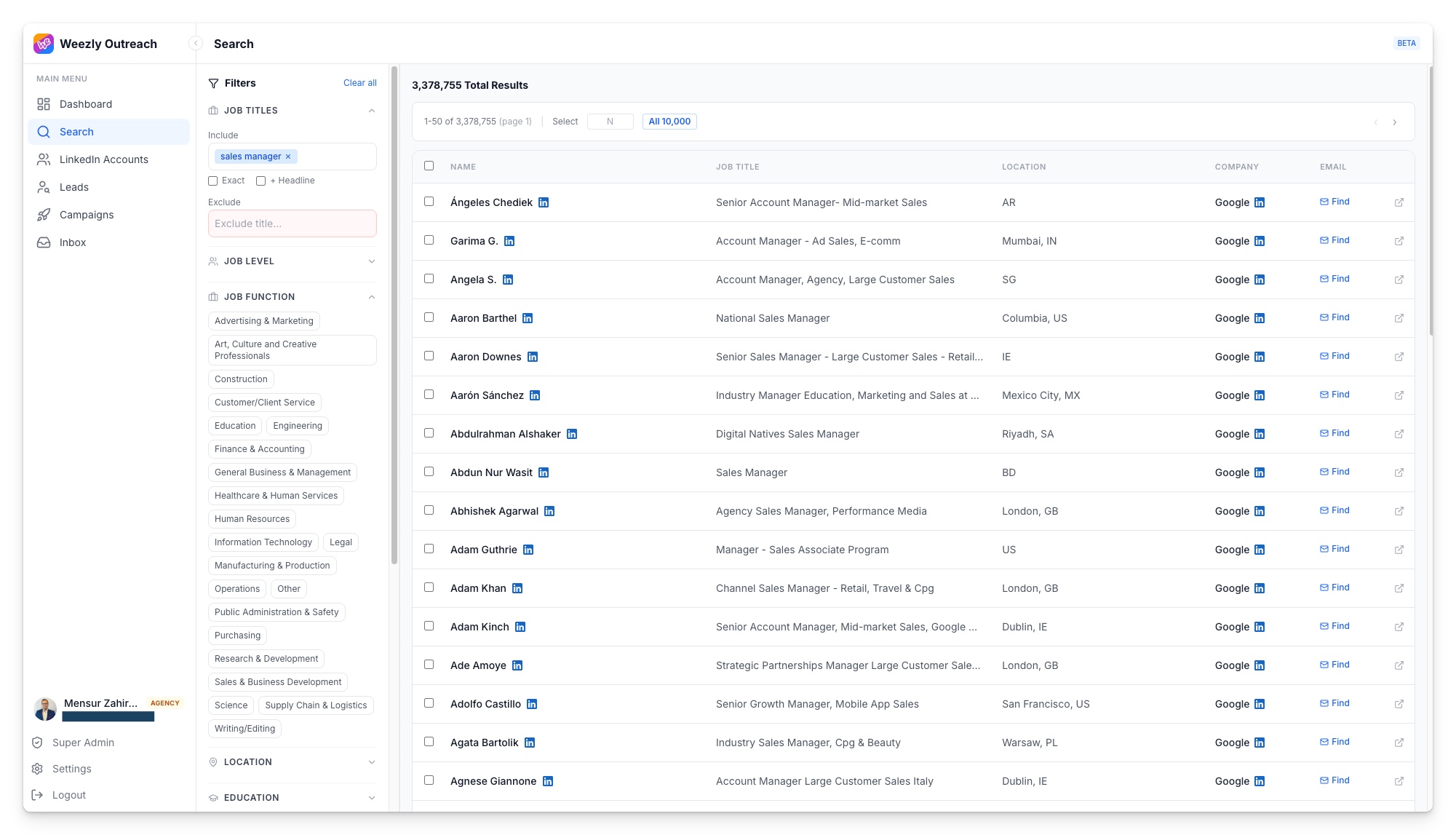
Their email finder matches addresses for profiles you already found, 620 to 3,100 credits a month, and the credits reset. This is the other model: below, the actual product.
 A finder, metered by credits
Linked Helper's Email Finder is real and useful: it matches emails for 2nd and 3rd degree profiles you have already found on LinkedIn. It is also rationed: 620 Data credits a month on Standard, about 3,100 on Pro.
Their published pricing and docs, July 2026.
A database you search300M+ contacts inside the same subscription. Filter by title, company, location and more, watch the emails verify at search time, select the lot and push it straight into a campaign.
 Apollo
 Prospeo
 Lusha
LushaThe inbox they never built, in your pocket.
Reviewers call the missing unified inbox Linked Helper's most frustrating daily limitation. Weezly ships the Unibox, an AI-sorted pipeline, and a phone app that watches your senders' safety limits.
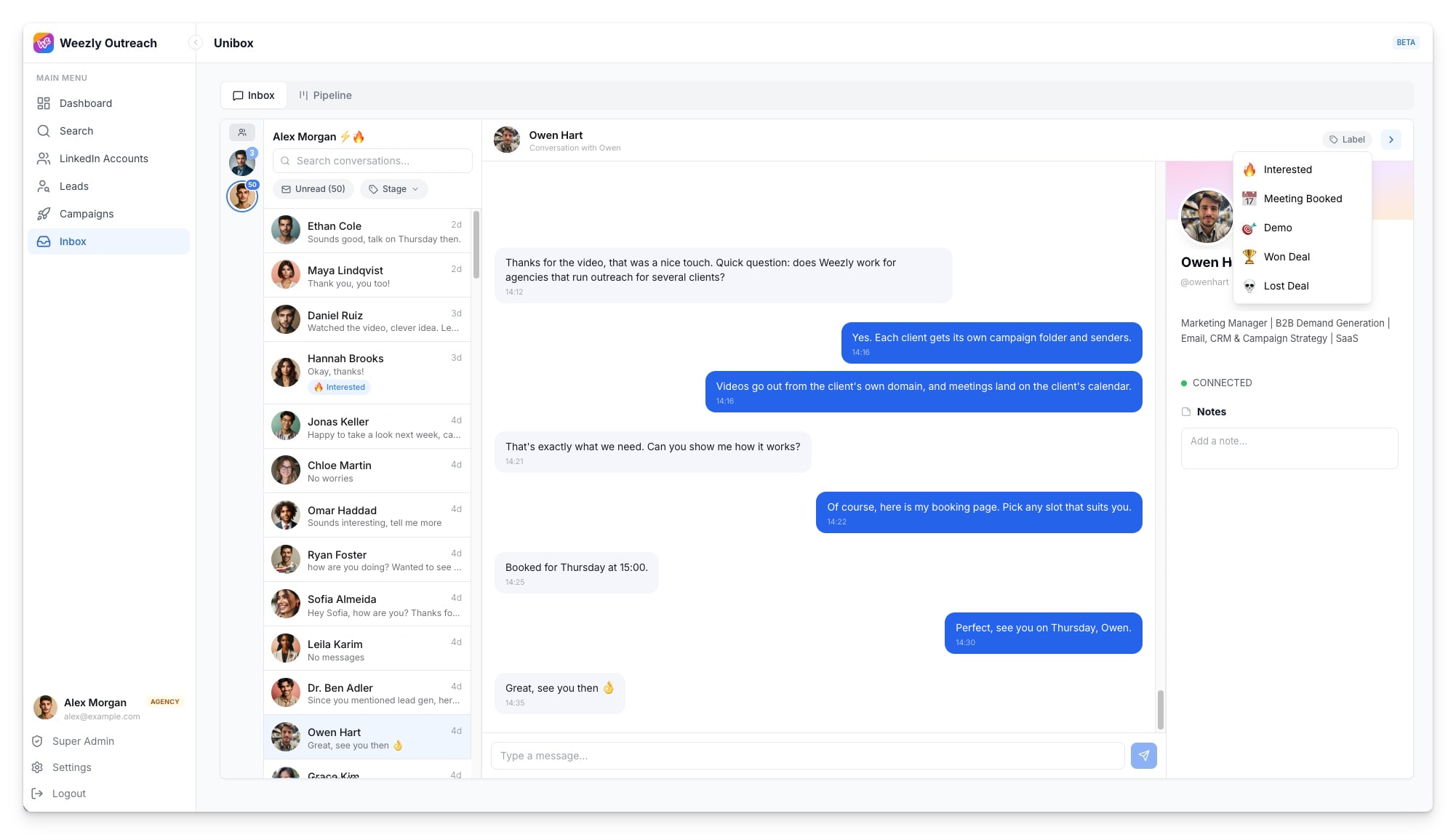



Linked Helper is a Windows, macOS and Ubuntu desktop app. There is no phone in that story.
And yes, we send safely too.
Their desktop safety model is credited above, honestly. Ours does the same job from the cloud, which means it also works at 2 AM.
Safe like theirs. Awake unlike theirs.
Linked Helper's no-code-injection desktop model is a real safety argument and we said so above. Weezly runs the same caution from the cloud: SSI-based caps, sender rotation, human-like pacing, with no machine of yours in the loop.
No VPS to rent, nothing to install
Recommended: 34 invites/day
Read per account, applied in one click
Sending as Alex M.
One license per account there, too
Both tools are LinkedIn-first today. Fair is fair.
 HeyReach
 Expandi
 La Growth Machine
 lemlist
 Dripify
 WaalaxyAll inside Weezly Outreach
$15 runs on your laptop. $59 runs your pipeline.
Let us be direct: if all you want is the cheapest possible LinkedIn sender and you do not mind the babysitting, Linked Helper wins on price and we will not pretend otherwise. The comparison worth making is what each subscription is for.
Linked Helpertheir published pricing, July 2026$8.25/mo on annual. Pro is $45/mo, $24.75 annual. Genuinely the price champion, and every account needs its own license. Check their pricing, it changes.
Weezly One loginYes, about four times their entry price. It buys the tools they price separately or simply do not have.
"Once I turned off my laptop, all prospecting activities immediately ceased. That's quite frustrating."
"The absence of a unified messaging inbox was perhaps the most frustrating daily limitation."
"It feels outdated, cluttered, and not very intuitive, so even simple tasks can take longer than they should."
Public reviews, July 2026. Notice these are architecture complaints, not price complaints: nobody is angry about $15. They are angry the campaign stopped when the laptop did.
The fair fight, their wins included.
Linked Helper takes the price row outright, and its safety model and action breadth are real. Read the rest of the column and ask what happens after the message sends.
| Capability | Weezly | Linked Helper |
|---|---|---|
| Price per LinkedIn accountTheir win | $59/mo per sender, whole platform included | From $15/mo, $8.25/mo on annual. The honest price champion (their published pricing, July 2026) |
| Safety by designFair fight | Cloud sending with SSI-based caps per account | Desktop app, no code injected into LinkedIn, a real and defensible model |
| Raw LinkedIn action breadthFair fight | 10 step types, built around converting | 30+ actions across 7 campaign types |
| Built-in CRMFair fight | AI-sorted reply pipeline, Interested to Won | LH CRM: tags, notes, interaction history |
| Runs while your laptop is off | Cloud, always on | Only on a VPS you rent and configure yourself |
| Real video file uploaded natively in the DM | Generated per lead from your clone | |
| AI face and voice cloning, 25 languages | One 2-minute recording, ever | |
| Voice notes as sequence steps | Not advertised | |
| Searchable leads database included | 300M+ contacts, emails verified at search time | Email finder with monthly credits that reset |
| Unified inbox for replies | Unibox: every sender, one inbox, whole team | No, replies are managed on LinkedIn itself |
| Booking pages and scheduling included | A booking page under every video | Not advertised |
| Mobile app with AI reply alerts (iOS + Android) | No, desktop only: Windows, macOS, Ubuntu |
Linked Helper capabilities from their published site, pricing and help docs, July 2026. "Not advertised" means exactly that, we could not find it on their public pages.
Weezly vs Linked Helper, answered
Live demo
Watch Weezly work. On you.
A real outreach on you, end to end. One demo, nothing more.
Says your name, mentions your company, lands in your DM.
The whole outreach, not just a video
- 1Profile enriched
- 2AI clone video
- 3Connection request
- 4
 Video in your DM
Close the laptop. Keep sending.
Linked Helper earned its $15 by being the honest price champion of desktop automation. Weezly earns $59 by working nights: cloud sending, your AI clone's video native in the DM, a pipeline on the replies and a booking page on the meeting. Switching takes an afternoon, and nothing to install.