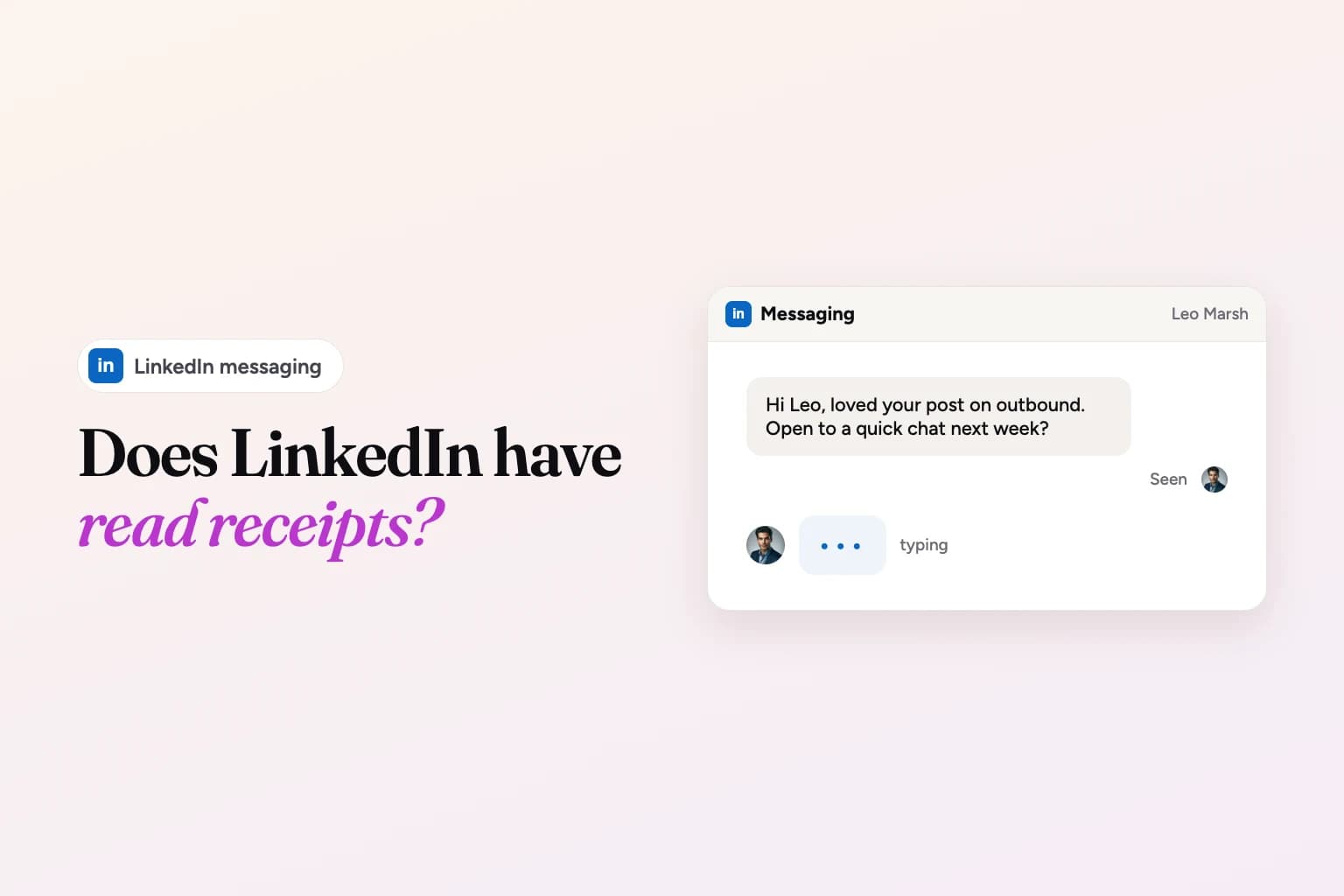
Yes, LinkedIn has read receipts. When someone reads a message you sent, a small copy of their profile photo appears next to it. You'll only see it if neither of you has turned off LinkedIn's "Delivery and typing indicators" setting, and you'll never see it on InMail.
That's the short answer. Below is what each indicator means, exactly where the setting lives on desktop and mobile, the cases where a read receipt never shows up, and what a "read but no reply" should change about your follow-up. Every step comes from LinkedIn's own Help Center, checked in November 2026.
A quick note on who's writing this: we make Weezly, a LinkedIn and email outreach tool. There's a short section about it near the end. Everything above it is about LinkedIn itself.
How LinkedIn read receipts work
LinkedIn calls the feature delivery and typing indicators. It's one setting that controls two things:
- The delivery indicator (the read receipt). Once the other person has read your message, a small profile photo of them appears next to it.
- The typing indicator. You see when the other person is typing a reply. LinkedIn says this is on by default.
According to LinkedIn's Delivery and typing indicators help article, when the setting is on, the indicators show for all messages between you and your connections. When it's off, "no one in the conversation, including you" can see whether messages have been read or whether someone is typing. So it works both ways: if you hide your read receipts, you lose theirs too.
What each message status means
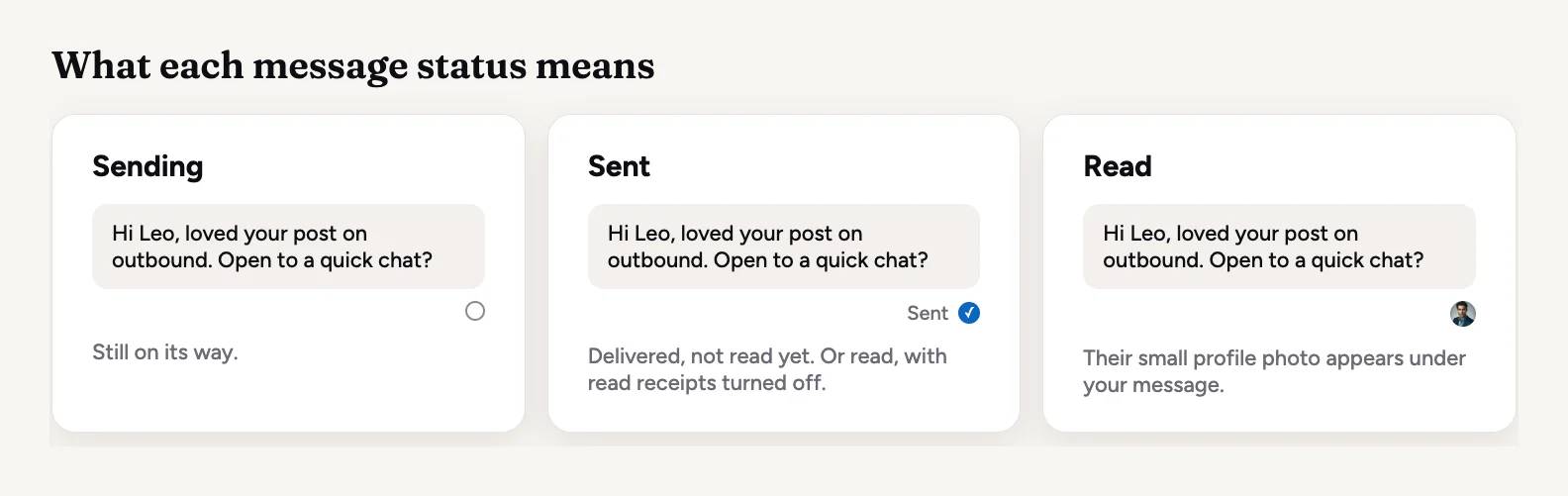
LinkedIn's message indicators article lists three statuses for a message you send:
| Status | What it means |
|---|---|
| Sending message | The message is on its way. If it fails, you'll see an error asking you to try again. |
| Message sent | It went through and will be delivered to the recipient's inbox. |
| Message read | The recipient has read it. This is where their small profile photo appears. |
If the other person has turned read receipts off, your message just stays at Sent. That's the key thing to know: "Sent" doesn't mean "unread". It can also mean "read by someone who has receipts turned off".
On your own side, LinkedIn uses two badges for incoming messages: a red badge on the Messaging icon counts messages you haven't seen yet, and a blue badge next to a conversation counts messages you haven't read. Clicking the Messaging icon clears the red count even if some messages are still unread.
How to turn read receipts on or off
The steps below are LinkedIn's own. One toggle controls read receipts and typing indicators together; you can't keep one and hide the other.
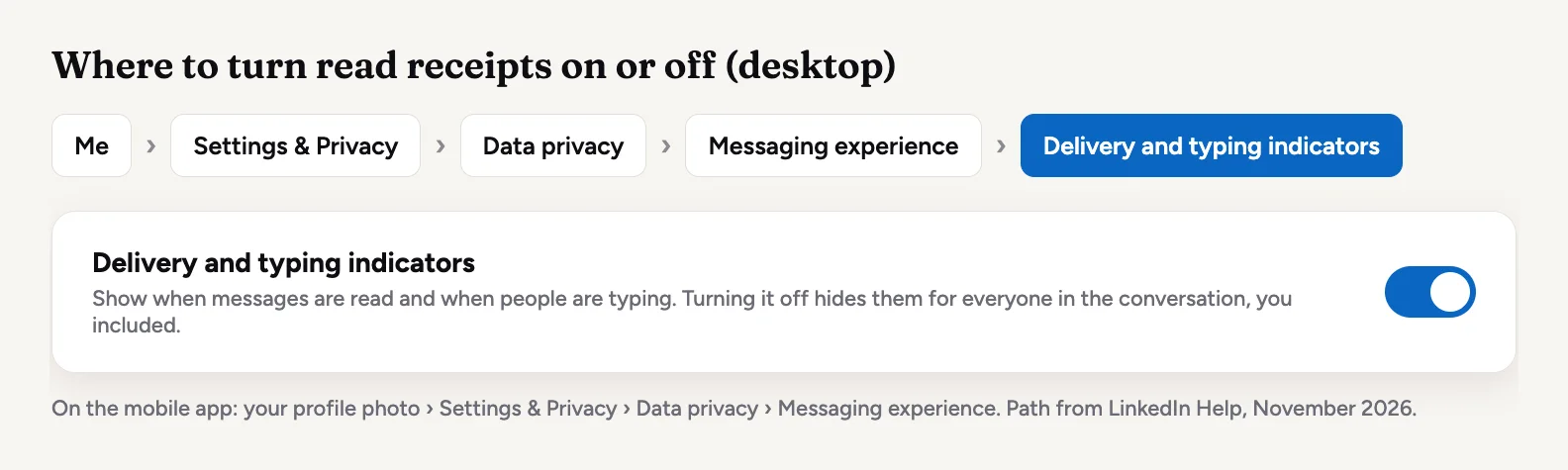
On desktop
- Click the Me icon at the top of your LinkedIn homepage.
- Select Settings & Privacy from the dropdown.
- Click Data privacy on the left.
- Under Messaging experience, click Delivery and typing indicators.
- Turn the toggle on or off.
On the LinkedIn app (iPhone and Android)
- Tap your profile photo, then tap Settings & Privacy.
- Tap Data privacy.
- Under Messaging experience, tap Delivery and typing indicators.
- Turn the toggle on or off.
Many older guides call this setting "Read receipts and typing indicators". The current name in LinkedIn's Help Center is "Delivery and typing indicators", so look for that if you can't find the old label.
Why you might not see a read receipt
If your message sits at "Sent", one of these is usually why:
- They turned the setting off. Your message will show as Sent whether they've read it or not.
- You turned it off. Since the setting works both ways, hiding your own receipts hides everyone else's from you.
- It was an InMail. LinkedIn states that read receipts and typing indicators do not appear to senders of InMail messages. That includes InMail you send from Premium, Sales Navigator or Recruiter.
- It's a message request they haven't accepted. When you message someone you aren't connected to, for example a fellow group member or a coworker, it arrives as a message request. LinkedIn says read receipts appear only after the recipient accepts it.
- They simply haven't read it. The boring answer is often the right one.
What about Sales Navigator? LinkedIn's Help Center doesn't describe read receipts for the Sales Navigator inbox separately. What it does say is that InMail never shows them, and when you message someone you aren't connected to from Sales Navigator, that message is usually an InMail. For InMail, the signal Sales Navigator gives you is the response itself: a reply, or an "Interested", "Maybe later" or "Not interested" quick reply, which also earns your credit back (more on that in our guide to InMail credits).
Should you turn read receipts off?
It depends on what you use LinkedIn for. If you prospect or recruit, keeping them on helps you: you know which messages landed and which ones still need a nudge. The trade-off is that the people you talk to can see when you've read their message too, which some people find creates pressure to answer right away.
If you get a lot of messages you don't plan to answer, turning them off gives you room. Just remember you'll lose the signal on your own outreach at the same time.
Read but no reply: what it means for your follow-up
A read receipt tells you one thing: they saw it. It doesn't tell you they decided against it. Busy people read messages on their phone between meetings and mean to come back later. So a read with no reply is a reason to follow up, not a reason to give up.
Some practical rules that hold up well:
- Wait a few working days. A follow-up an hour after the read receipt appears reads as pushy. LinkedIn itself sends InMail recipients an automatic reminder within three days, which is a sensible pace to borrow.
- Add something new. "Just bumping this" gives them nothing to respond to. A useful link, a short answer to a likely objection, or a smaller ask ("would a 15-minute call next week work?") does.
- Make it easy to say no. "If now isn't the time, just tell me and I'll stop" often gets a reply either way, and a clear no is better than silence.
- Change the format. If two text messages didn't land, a short voice note or video can, because it's different from everything else in their inbox.
- Stop after two or three follow-ups. If they've read three messages and said nothing, move on and come back in a few months with something new.
And if your messages stay at "Sent" with no read, don't assume they were ignored. The person may have receipts off. Treat it the same way as a read with no reply, and follow up once with something new.
Following up at scale with Weezly Outreach
If you send a lot of LinkedIn messages, keeping track of who read what and who needs a follow-up gets hard fast. Weezly Outreach runs your LinkedIn steps (invites, messages, voice notes, comments and an AI video in the DM) as one sequence, with the follow-ups spaced out for you, and puts every sender's LinkedIn conversations in one inbox, the Unibox.
The AI video step is the "change the format" rule from above: you record two minutes once, and Weezly makes a short video of your AI clone for each lead that plays right in the LinkedIn DM. In our campaigns, messages with video got a 2.7x higher reply rate and 68% of leads watched the video (Video numbers, Weezly campaigns).
The Growth plan is $59 a month per LinkedIn sender and includes the Leads Database, booking pages and the Unibox; AI video minutes are an add-on, from $99 (Weezly pricing, November 2026). There's a free trial: 21 days on the Multichannel seat, 7 days on the Growth plan. If that sounds useful, start a free trial.
LinkedIn read receipts FAQ
Can someone see if I read their LinkedIn message?
Yes, if both of you have delivery and typing indicators turned on. Your small profile photo appears next to their message once you've read it. Turn the setting off and they won't see it, but you'll stop seeing theirs too.
Are LinkedIn read receipts on by default?
LinkedIn's Help Center says typing indicators are on by default. Both are controlled by the same toggle, so unless you or the other person changed it, you'll usually see both.
Does LinkedIn show read receipts for InMail?
No. LinkedIn states that read receipts and typing indicators do not appear to senders of InMail messages. You'll know an InMail worked when you get a response.
Can I turn off typing indicators but keep read receipts?
No. LinkedIn has one toggle, "Delivery and typing indicators", for both.
What does "Sent" mean on a LinkedIn message?
It means the message was delivered to their inbox. It stays at Sent if they haven't read it yet, or if they read it with read receipts turned off. You can't tell those two apart.
Does LinkedIn tell people when I read their message request?
Not until you accept it. LinkedIn says read receipts on message requests appear only after the recipient accepts the request.
Does LinkedIn show when someone reads a connection request note?
LinkedIn's Help Center doesn't describe a read receipt for invitation notes. If they reply to the note, the conversation shows up in your messages, even if they haven't accepted the invitation. For more on reaching people you aren't connected to, see what 1st, 2nd and 3rd mean on LinkedIn.